Shipping learning content rarely fails because of authoring. It fails during review.
Feedback gets scattered across email and Slack, versions drift, subject matter experts (SMEs) become a bottleneck, and launch timelines slip.
This update fixes the training content review process with three improvements:
- course review collaboration with in-workspace comments
- SME review by email (no account required)
- a faster, more scalable 7taps workspace for larger libraries and audiences
With in-workspace comments, built-in SME review, and major performance improvements across the 7taps workspace, teams can now review faster, collaborate with confidence, and scale content creation without friction.
Comments for course review collaboration
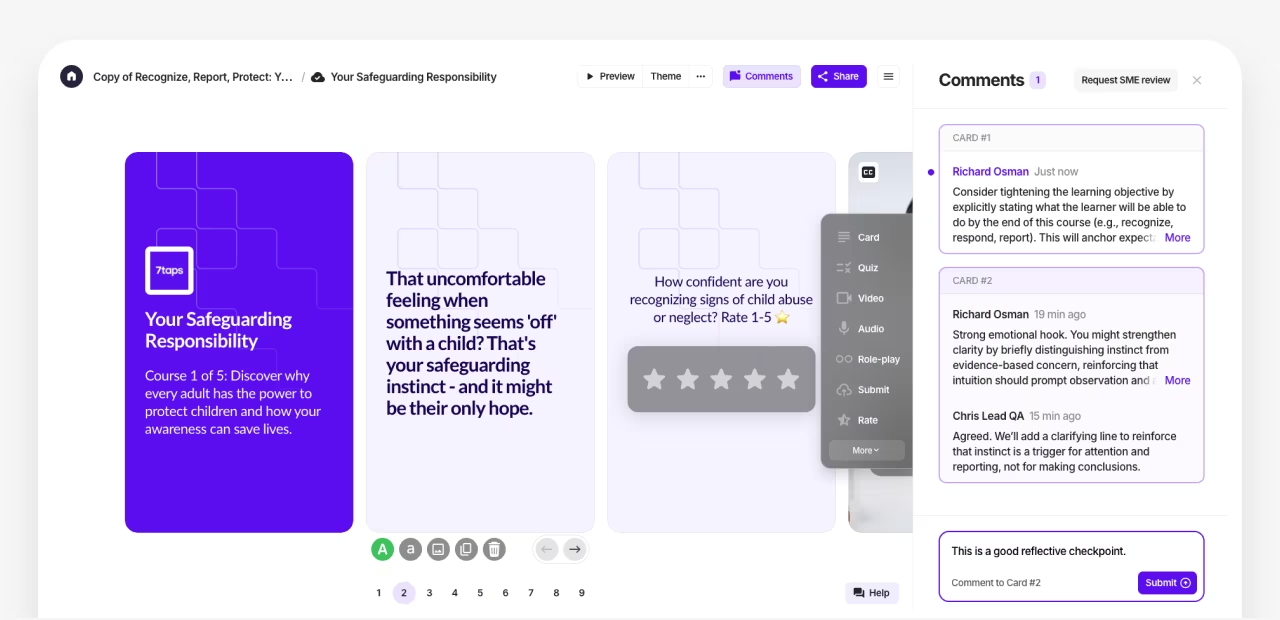
Great learning is built by teams. But course review collaboration shouldn’t require screenshots, side docs, or last-minute threads.
7taps now includes native Comments inside the workspace for both live courses and drafts (even before they’re shared).
Key improvements:
- Comments stay tied to specific cards (not just the course)
- Discussions remain intact even if cards move or reorder
- Authors and collaborators get notified in-app and by email
Result: feedback stays contextual, visible, and easy to act on—without leaving the course.
Subject Matter Expert (SME) review for training content (without the friction)
The hardest reviewers to involve are often the most important: SMEs. They’re busy, external, and don’t want another login.
With SME Review, you can invite experts to review any live course by email—even if they’re not part of your workspace or existing users.
How SME Review works:
1. Invite an SME by email
2. They open the course in a dedicated review mode (no registration required)
3. They can comment on cards, answer polls, and test interactions
4. Your team sees all feedback in the same Comments thread
What makes this scalable:
- SME activity doesn’t affect live course analytics, so reviewers won’t contaminate learner data
- When an SME marks review complete, collaborators are notified automatically
- Teams can resolve feedback card-by-card to keep reviews moving
This turns SME feedback from a bottleneck into a repeatable review and approval workflow.
A faster, more scalable 7taps workspace
Alongside collaboration features, we made significant improvements to speed, usability, and scalability, especially for teams managing larger course libraries.
Highlights:
- New Team Courses layout with multiple views and faster ways to find what you need
- More robust analytics designed to support bigger programs and deeper reporting
- Enhanced workspace-wide search to find courses and content across your library
- Faster image processing and improved file handling during uploads
- 80+ usability and workflow upgrades that make everyday creation smoother
Most of this work happens quietly, but the impact is immediate: less waiting, fewer workarounds, and smoother day-to-day course creation.
What’s next
These updates support a broader 2026 focus: helping teams build, review, and scale microlearning without process overhead.
If you want early access to upcoming features, release notes, and a place to propose and vote on ideas, join the MicrolearningPRO Community and follow the Release Notes channel.
Your feedback continues to shape what we build next.